

A clean DTF application is not about guessing at heat and hoping for the best. It comes from a repeatable process: prepare the garment, use even pressure, let the film cool fully, and finish the print properly. That process protects your blanks, keeps colors vivid, and helps every order look retail-ready.
For small businesses, Etsy sellers, apparel brands, and busy print shops, learning how to press DTF transfers correctly turns a press-ready print into dependable merchandise. Whether you are producing one custom tee or a full run of uniforms, consistent heat press settings prevent peeling edges, dull color, and wasted garments.
At Five Star DTF, we recommend treating every new blank or fabric blend as a quick test opportunity. A 30-second test press can save a whole stack of shirts, especially when you are working with polyester, stretch fabrics, fleece, or heat-sensitive garments.
DTF Heat Press Settings at a Glance
Use these numbers as a strong starting point, then follow the instructions included with your transfer and adjust for your specific press.
| Fabric Type | Temperature | Press Time | Peel | Pressure |
|---|---|---|---|---|
| Cotton and blends | 315°F | 15 seconds | Cold | Firm to high |
| Polyester activewear | 300°F | 10 to 12 seconds | Cold | Firm |
| Nylon and stretch fabrics | 305°F | 12 to 15 seconds | Cold | Firm |
| Glitter DTF | 320°F | 8 to 10 seconds | Cold | Medium-firm |
Heat presses can vary, even when their display shows the same temperature. Check your platen with a reliable temperature tool, keep the pressure consistent, and test before running a production batch.
How to Press DTF Transfers Step by Step
Step 1: Prepare Your Heat Press and Work Area
Start with a clean lower platen, a lint-free garment, and a press that has reached its set temperature. Dust, loose fibers, and wrinkles can create weak spots under the transfer. A lint roller is a simple but valuable tool for dark shirts, fleece, and garments that collect lint quickly.
Make sure your press closes evenly across the full print area. Uneven contact is one of the main reasons a large chest design can adhere in the center while lifting around the edges.
Step 2: Pre-Press the Garment
Pre-press the shirt for three to five seconds. This removes moisture and smooths wrinkles so the adhesive can bond directly to the fabric. Do not over-press delicate polyester or performance garments, because excessive heat and pressure can leave shiny marks.
For hoodies, move bulky seams, drawstrings, pockets, and zippers away from the platen whenever possible. Pressing on an uneven surface reduces pressure where you need it most.
Step 3: Align the DTF Transfer Carefully
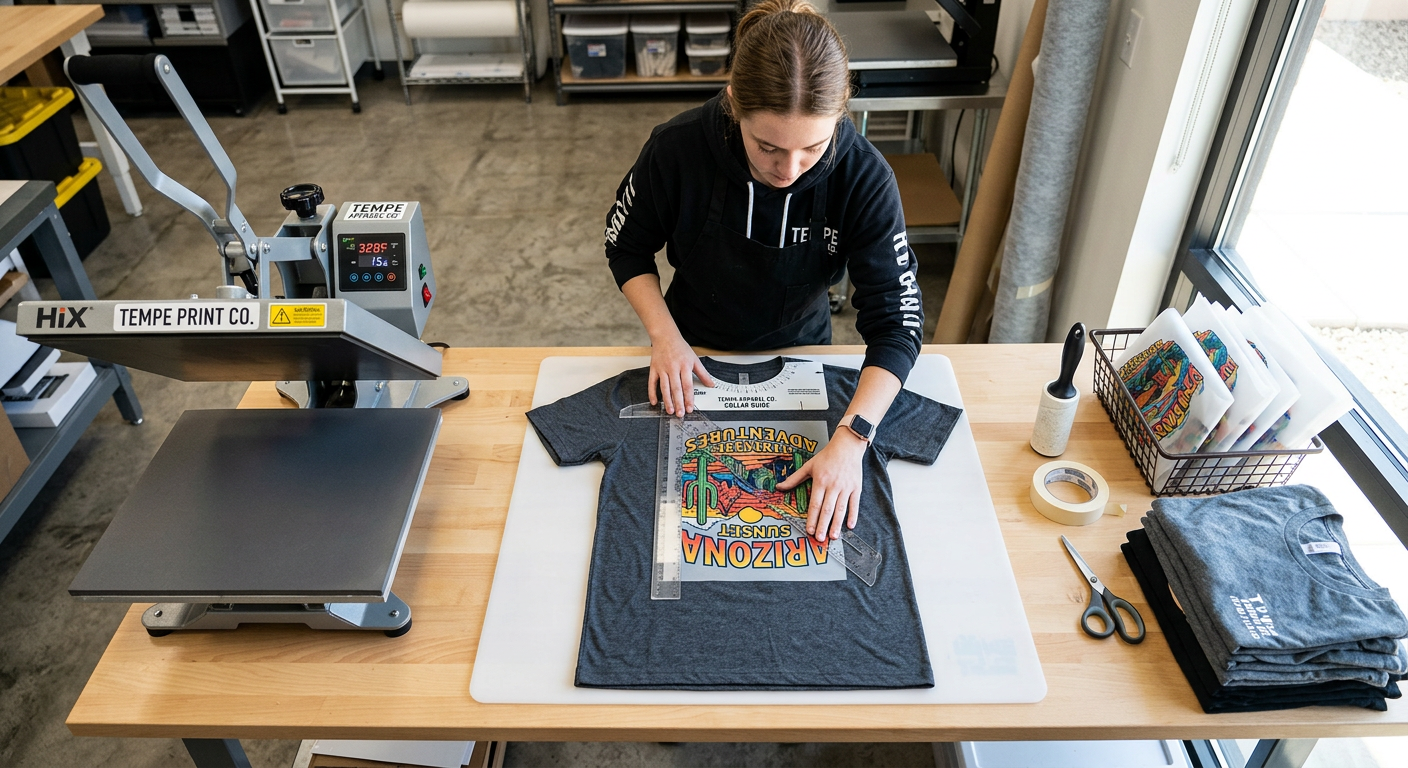
Place the transfer with the printed side against the garment and the clear carrier film facing up. Use a collar guide, ruler, or T-square for consistent placement, especially when you are producing multiple shirts for a client, team, or online order.
Avoid stretching the garment while positioning the artwork. The fabric should sit flat and relaxed. If you need extra stability, use a small piece of heat-resistant tape outside the design area.
Step 4: Press With Firm, Even Pressure
For standard cotton and cotton-blend shirts, press at 315°F for 15 seconds with firm to high pressure. The goal is complete contact across the whole transfer, not excessive force that distorts the garment.
When pressing polyester, reduce the heat to about 300°F and shorten the press time to 10 to 12 seconds. This lower-temperature approach helps reduce scorch marks, shine, and dye migration risk on athletic apparel.
Step 5: Let the Film Cool Completely
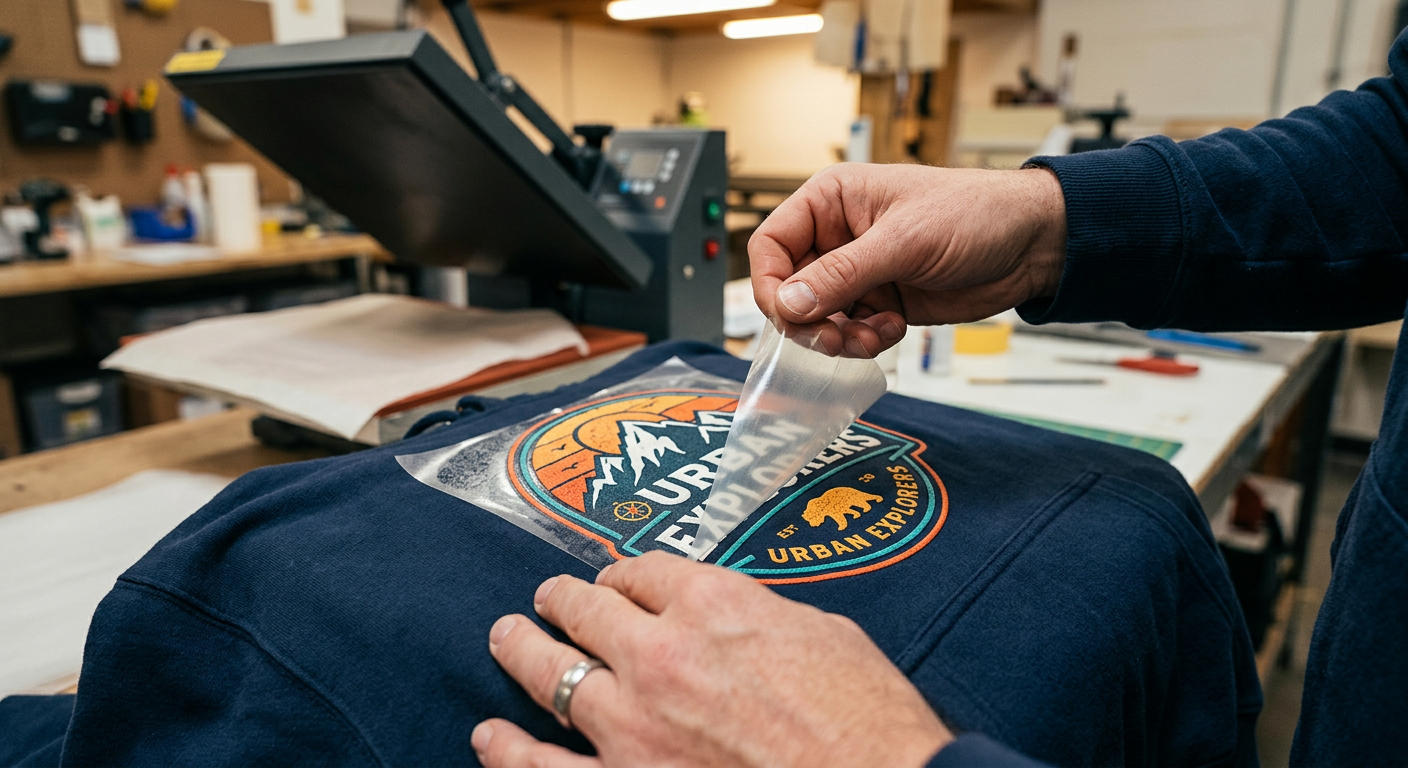
Cold peel means fully cooled. Give the garment enough time to cool before lifting the carrier film from one corner in a slow, steady motion. Peeling too soon can pull up tiny details, leave a cloudy finish, or weaken the edges of the design.
If part of the transfer starts lifting, stop peeling. Lay the film back down, cover it if needed, press again for a few seconds, let it cool, and retry the peel. Do not pull aggressively.
Step 6: Finish Press for a Professional Feel
After removing the film, cover the design with parchment paper or a finishing sheet. Press again for about five seconds. This short final press helps smooth the print surface, improve the garment feel, and reinforce adhesion for long-lasting custom apparel.
A matte final press is a strong choice for everyday T-shirts, workwear, and team apparel. For a slightly different texture, experiment on a sample blank before you commit to a customer order.
The Details That Separate a Good Press From a Great One
Use Real Pressure, Not Just Heat
Heat activates the adhesive, but pressure brings the transfer and fabric together. A press that feels loose can create incomplete bonding, even at the correct temperature. If fine lines, corners, or small lettering lift after washing, inspect your pressure first.
For thicker garments, a pressing pillow or print pad can help level the print area. This is particularly useful around hoodie seams, ribbed collars, and zip-up garments.
Match the Settings to the Fabric
There is no single best DTF printer setting or heat press setting for every garment. Cotton can tolerate more heat than lightweight performance polyester. Nylon, spandex blends, and sublimated jerseys often need lower-temperature testing because they can be heat-sensitive.
Keep a simple production note for each blank you use. Record the garment brand, temperature, time, pressure, and finish press result. That small habit makes repeat orders faster and more consistent.
Start With Quality, Press-Ready Film
A correct press cannot fully rescue low-resolution art, poor adhesive coverage, or an outdated transfer. Use clean artwork at the intended print size, and order ready-to-press film from a supplier that understands apparel production.
Five Star DTF provides premium DTF transfers for creators who need vivid color, fine detail, no minimums, and fast production. For a deeper settings reference, keep the DTF press instructions and troubleshooting guide nearby at your heat press.
Common DTF Pressing Problems and Fast Fixes
The Transfer Is Lifting at the Corners
First, check pressure and make sure the garment was flat. Increase pressure slightly, verify that the platen is heating evenly, and press again before peeling. Also confirm that you waited until the film was completely cool.
The Print Looks Dull or Hazy
A hazy finish often comes from peeling while the transfer is still warm. Let the garment cool longer, then apply a brief finish press with parchment. If the print still looks under-bonded, add a few seconds to the initial press on your next test.
The Shirt Has a Shiny Press Box
This usually happens on polyester or delicate synthetic fabric when heat or pressure is too high. Lower the temperature, shorten the pre-press, use a pressing pillow if needed, and test a less aggressive setting.
Fine Details Did Not Transfer
Tiny elements need full, even pressure. Make sure seams are off the platen, the garment is lint-free, and the press closes flat. If your artwork itself contains extremely thin lines, consider thickening those details before production.
Specialty Transfers Need Their Own Workflow
Glitter transfers add high-impact shine for boutique apparel, dance teams, spirit wear, and limited-edition merch. They need a cold peel, but they benefit from a longer second press. Review the product-specific guidance before pressing Glitter DTF transfers, especially when working with textured fabrics.
UV DTF is different. These durable decals are made for hard surfaces such as tumblers, glass, packaging, plastic, wood, and metal, not heat pressing onto shirts. If you are expanding beyond apparel, UV DTF stickers create a fast way to brand products, gift items, and packaging without a heat press.
Keep Your Finished DTF Apparel Looking New
Wait at least 24 hours before the first wash when possible. Wash garments inside out with cold water and mild detergent, then use low heat or hang dry. Avoid bleach, harsh fabric softeners, and direct ironing on the printed area.
For resale orders, include a simple care card with your shirts. It reduces avoidable customer issues and makes your brand look more professional from the first sale to the fiftieth.
Frequently Asked Questions
What temperature should we use for DTF transfers?
For most cotton and cotton-blend garments, start at 315°F for 15 seconds with firm to high pressure. Polyester and activewear typically perform better around 300°F for 10 to 12 seconds. Always test a new garment before full production.
Do we peel DTF transfers hot or cold?
Most standard DTF transfers use a cold peel. Let the carrier film cool completely before peeling slowly from one corner. Peeling early can cause lifting and a cloudy result.
Do we need parchment paper for DTF?
Parchment paper is recommended for the final press. It protects the print and fabric while helping create a smoother, more durable finish.
Can we press DTF transfers on polyester?
Yes. DTF works well on polyester, but polyester needs controlled heat. Start lower, use a shorter press time, and test heat-sensitive or sublimated garments for dye migration and shine.
Can we use a small hobby press for DTF transfers?
Yes, provided the press can deliver accurate heat and consistent pressure across the entire design. For larger artwork or repeat production, a clamshell or swing-away heat press offers better consistency.
Why did the DTF transfer peel off after washing?
The usual causes are insufficient pressure, incorrect heat, peeling before the film cooled, or skipping the finish press. Review your process, test the press temperature, and keep notes on settings for each garment type.
Press Better, Waste Less, Sell With Confidence
The best DTF results come from process control, not luck. Pre-press the garment, align it flat, use firm and even pressure, cold peel patiently, and finish press the design. Once your workflow is dialed in, you can move from one-offs to repeat orders with confidence.
Consistent pressing protects your margins, strengthens your reputation, and gives customers apparel they will want to wear again and again.
Get Press-Ready Transfers From Tempe
Need dependable film for your next apparel run? Order DTF transfers online from Five Star DTF for same-day printing and shipping on qualifying orders, no minimums, and free shipping over $100. We are printed in Tempe, shipped nationwide, with convenient local pickup at 305 S Rockford Dr Ste B, Tempe, AZ 85281.
For order questions, artwork support, or local pickup details, reach our team through the Five Star DTF contact page. We help Arizona creators and nationwide apparel sellers keep production moving.
Summary
To press DTF transfers successfully, use accurate heat, firm pressure, a complete cold peel, and a brief final press. Start with 315°F for 15 seconds on cotton and blends, then lower the temperature for polyester or sensitive performance fabrics. Build a repeatable workflow, test unfamiliar blanks, and your custom apparel will stay vivid, flexible, and durable.
About Five Star DTF
Five Star DTF is Arizona’s leading provider of
DTF transfers, Glitter DTF prints, UV DTF stickers,
and Sublimation transfers — offering same-day printing, fast nationwide shipping,
and convenient local pickup in Tempe, Arizona.
We proudly serve Tempe, Scottsdale, Phoenix, Mesa, Gilbert, Chandler, and all of Arizona,
helping creators, apparel brands, small businesses, and print shops produce premium, press-ready transfers with
vivid color, soft stretch, and long-lasting durability.
There are no setup fees, no minimum orders, and turnarounds are always fast.
Our Top Products
- DTF Transfers
- Glitter DTF Transfers
- UV DTF Stickers
- Sublimation Transfers
- Press Instructions & Tips
- Contact & Local Pickup
Artwork Help
Need your artwork cleaned, fixed, resized, or made print-ready? We offer background removal, vectorizing, color correction, and gang sheet layout.
Ready to Print?
Order DTF Transfers or
Upload Your Artwork to get started today.
All orders over $100 ship free — printed in Tempe, AZ and shipped statewide and nationwide.