
Introduction
Getting the press just right can make or break your transfer. If you’ve ever had a design look great on film but come out dull, cracked, or peeling after wash tests, the issue is usually not the artwork, it’s the press settings.
That’s why dialing in dtf heat press settings matters so much. The right time, temperature, and pressure help your transfer bond cleanly, stretch properly, and hold up on real garments, whether you’re pressing T-shirts, hoodies, uniforms, or resale-ready merch.
The Core DTF Heat Press Settings
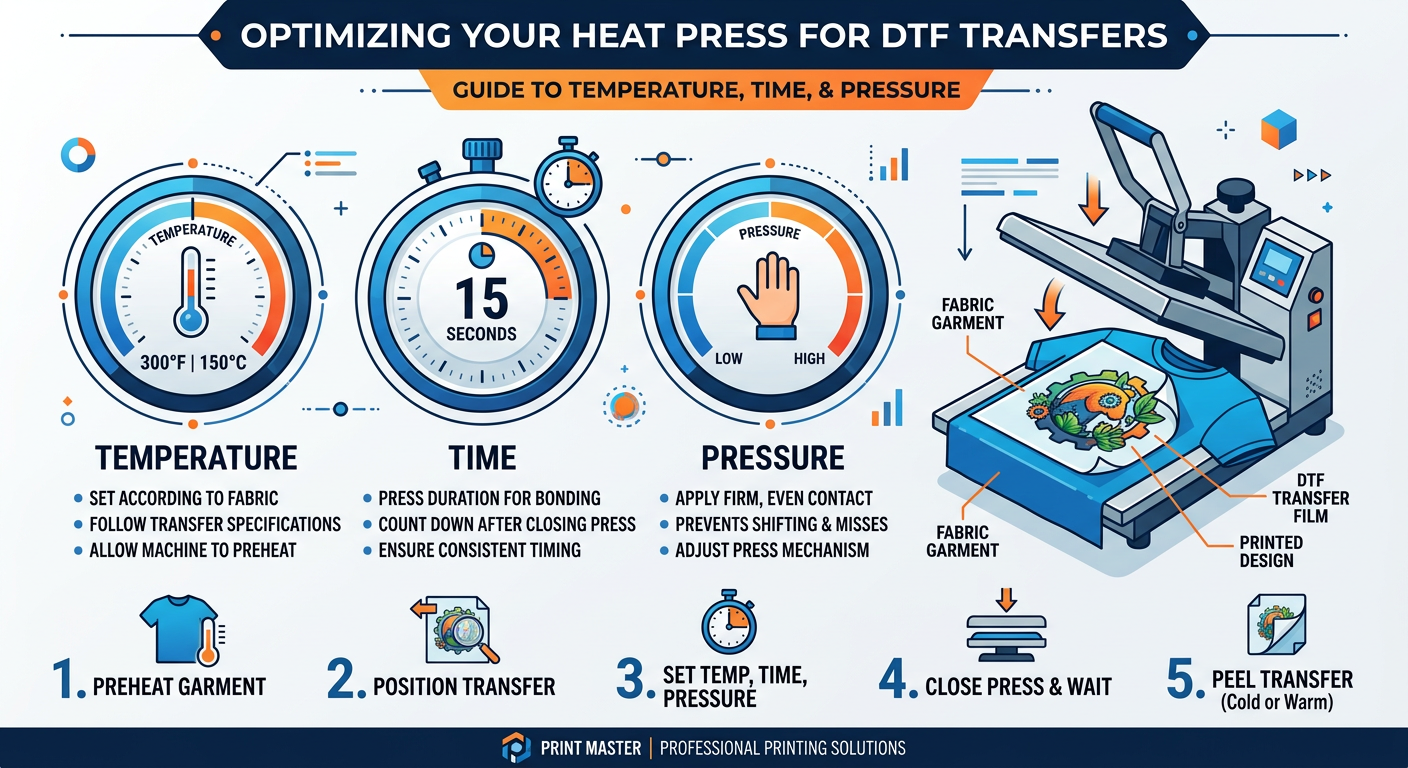
For most DTF transfers, a strong starting point is 300 to 325 degrees Fahrenheit for 10 to 15 seconds with medium to firm pressure. Exact settings can vary depending on the garment fabric, your press, and the transfer type, so it helps to test before running a full batch.
Temperature
Higher temperature helps activate the adhesive, but too much heat can flatten the look of the print or affect delicate fabrics. Cotton usually handles a wider range well, while polyester and blends may need a little more care to avoid scorch marks or heat press shine.
Time
Most applications fall in the 10 to 15 second range. Shorter press times can leave the transfer undercured, while longer times can overpress the design and reduce the soft feel people love in DTF printing.
Pressure
Medium to firm pressure is usually best. You want even contact across the full design so the adhesive fully bonds, but not so much pressure that you distort seams, textures, or garment fibers.
Recommended Settings by Fabric
Different garments respond differently to heat, so this is where a lot of small businesses get better results with a few simple adjustments.
Cotton
Cotton is one of the easiest materials for DTF transfers. A standard press setting often works well here, and the fabric usually tolerates medium to firm pressure without issue.
Polyester
Polyester can be trickier because it is more sensitive to heat. Use lower pressure and keep a close eye on temperature to reduce shine, dye migration, or heat marks.
Cotton Poly Blends
Blends usually sit in the middle. Start with standard DTF heat press settings, then adjust based on how the fabric responds after peeling and after a wash test.
Hoodies and Thick Garments
Thicker items need more even pressure and sometimes a slightly longer press to ensure the adhesive reaches all parts of the design. Pre-pressing helps remove moisture and flatten seams before you apply the transfer.
Hot Peel vs Cold Peel
This is one of the biggest areas where people get confused, and it matters a lot.
Hot peel transfers can be removed right away, which speeds up production. Cold peel transfers need to cool before the film comes off, which can produce a cleaner, more stable finish depending on the film and adhesive used.
If you are ordering from a reliable supplier like DTF Transfers, always follow the recommended peel method for that specific transfer. That one detail can save a lot of wasted blanks.
Best Practices for Better Results
A great press is not just about the numbers. It is also about the process.
Pre-Press Every Garment
Pre-pressing removes moisture and wrinkles, which helps the adhesive bond evenly. It also gives you a cleaner surface to work with, especially on thicker cotton items and hoodies.
Use a Cover Sheet
A parchment sheet, butcher paper, or protective sheet can help keep your transfer surface clean and prevent unwanted shine. It also protects your heat press platen and keeps production more consistent.
Test Before Bulk Runs
If you are printing for a customer, always test a sample first. That is the safest way to confirm your settings, color result, and peel behavior before you move into a larger order.
Keep Your Workspace Consistent
The same transfer can act differently if your press pressure is uneven or your temperature reads off. A well-maintained machine gives you more predictable results, which is critical for resale and repeat orders.
Common Mistakes to Avoid
Even experienced press operators run into issues when they rush.
- Pressing on damp fabric
- Using too little pressure
- Overheating polyester
- Skipping the pre-press step
- Peeling too early on cold peel film
- Not checking platen evenness
If you want fewer mistakes and better output, start with the manufacturer guidance on Instructions and then fine-tune from there.
When to Upgrade Your Transfers
Sometimes the problem is not your press at all. If your transfers are inconsistent, low resolution, or hard to peel, the source material may be the issue.
That is where a dependable supplier matters. For fast-turn jobs, same-day pickup, or wholesale ordering, Five Star DTF gives Arizona creators a reliable option for Glitter DTF Transfers, UV DTF Stickers, and standard press-ready transfers with no minimums.
FAQ
What are the best dtf heat press settings for beginners?
A simple starting point is 300 to 325 degrees Fahrenheit, 10 to 15 seconds, and medium pressure. From there, adjust slightly based on garment type and transfer instructions.
Do DTF transfers work on polyester?
Yes, but polyester needs more care. Use careful temperature control and lighter pressure to avoid shine, scorch marks, or dye issues.
Should I pre-press garments before applying DTF?
Yes. Pre-pressing removes moisture and helps the adhesive bond more evenly, which improves durability and finish.
Can I use the same settings on T-shirts and hoodies?
Not always. Hoodies are thicker and usually need more even pressure and a little more attention to consistent heat coverage.
How do I know if I used too much heat?
Signs include shine, distortion, overly stiff areas, or a flattened look to the print. Polyester fabrics are especially prone to heat-related issues.
Where can I order press-ready DTF transfers in Arizona?
You can order online from Five Star DTF for local pickup in Tempe or fast nationwide shipping. If you need quick turnaround, start with DTF Transfers and check the Contact page for help.
Ready to Press Better
If you want cleaner results, faster production, and transfers that are ready when your orders are, the right settings are only part of the equation. The other part is working with a print partner that understands speed, consistency, and real-world apparel production.
Order online: https://fivestardtf.com/product/dtf-transfers/
📍 Local pickup: 305 S Rockford Dr Ste B, Tempe, AZ 85281
Conclusion
Mastering press settings is one of the fastest ways to improve your results. Once you get the right balance of temperature, time, pressure, and peel method, your DTF transfers will look better, last longer, and sell more confidently.
For small businesses, Etsy sellers, print shops, and apparel brands, that consistency matters. And if you need premium transfers printed in Tempe and shipped nationwide, Five Star DTF is ready to help.
About Five Star DTF
Five Star DTF is Arizona’s leading provider of
DTF transfers, Glitter DTF prints, UV DTF stickers,
and Sublimation transfers — offering same-day printing, fast nationwide shipping,
and convenient local pickup in Tempe, Arizona.
We proudly serve Tempe, Scottsdale, Phoenix, Mesa, Gilbert, Chandler, and all of Arizona,
helping creators, apparel brands, small businesses, and print shops produce premium, press-ready transfers with
vivid color, soft stretch, and long-lasting durability.
There are no setup fees, no minimum orders, and turnarounds are always fast.
Our Top Products
- DTF Transfers
- Glitter DTF Transfers
- UV DTF Stickers
- Sublimation Transfers
- Press Instructions & Tips
- Contact & Local Pickup
Artwork Help
Need your artwork cleaned, fixed, resized, or made print-ready? We offer background removal, vectorizing, color correction, and gang sheet layout.
Ready to Print?
Order DTF Transfers or
Upload Your Artwork to get started today.
All orders over $100 ship free — printed in Tempe, AZ and shipped statewide and nationwide.