

DTF Gang Sheet Builder Online for Cleaner, Faster Print Layouts
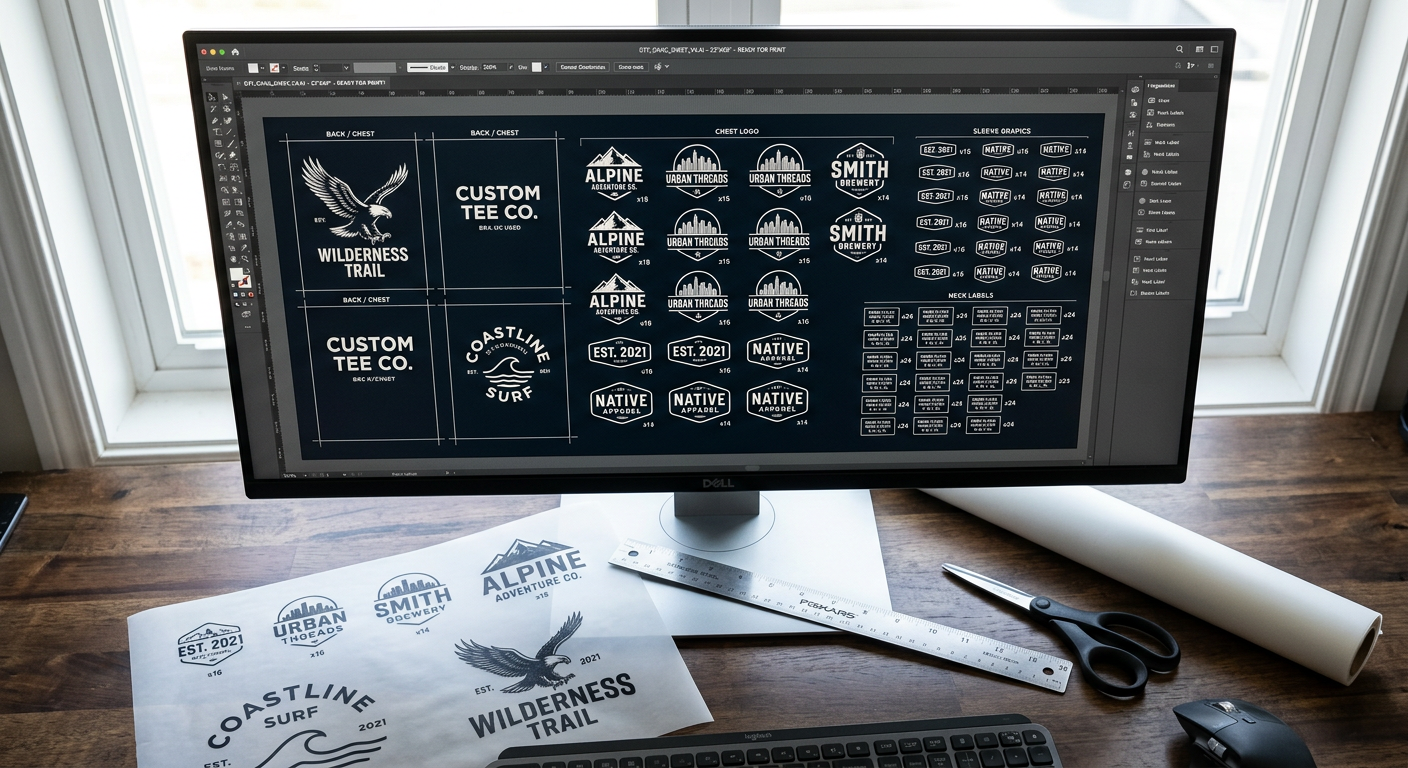
A crowded order board can make even great artwork feel expensive. When you need several small logos, sleeve prints, neck labels, and front designs, a DTF gang sheet builder online gives us a faster way to organize the job before it reaches the press.
The goal is simple: fit more useful artwork onto one layout without sacrificing print quality, cutting room, or production speed. For Etsy sellers, apparel brands, local print shops, and heat-press creators, a clean gang sheet can turn one mixed order into a ready-to-press production batch.
What an Online DTF Gang Sheet Builder Does
An online gang sheet builder lets us upload multiple designs, size them to their final dimensions, arrange them on a single transfer sheet, and prepare the artwork for DTF production. It is most valuable when an order includes many different small graphics that can be packed tightly together.
A gang sheet is not automatically the lowest-cost choice for every job. Five Star DTF notes that individual transfers are often more economical when designs are large, repeated, or leave substantial empty space on a sheet. The best option depends on usable print area, not the number of files in your folder.
| Order Type | Best Fit | Main Advantage | Watch For |
|---|---|---|---|
| Small logos and labels | Gang sheet | Fills open areas | Leave cutting space |
| Large front graphics | Individual transfers | Pay for exact size | Avoid oversized layouts |
| Mixed customer orders | Gang sheet | Groups many designs | Keep jobs organized |
| Repeated same-size art | Individual transfers | Faster ordering | Compare total area |
The Biggest Advantage Is Better Film Use
The strongest layouts start with the largest designs, then use smaller graphics to fill the remaining openings. Pocket logos, sleeve prints, youth sizes, care labels, and sample artwork are especially useful for closing gaps that would otherwise become paid-for blank film.
Think of the layout as production planning, not just design placement. When we group graphics by client, garment type, or order batch, cutting and pressing move faster after the transfers arrive. That matters when a shop is handling school spirit wear, event shirts, uniforms, or an active Etsy queue.
Online Builders Reduce Setup Friction
Building in a browser means you do not need advanced design software just to place a few logos on a sheet. You can work from a desktop or tablet, review actual sizes before checkout, and spot obvious wasted areas before submitting the job.
That said, a builder cannot repair weak artwork. A low-resolution screenshot stays low resolution when it is enlarged, and a white background saved inside a file can become an unwanted printed box. Start with production-ready artwork, then use the builder to make the layout efficient.
Build a Sheet That Presses Cleanly
A well-packed sheet still needs to be practical after printing. We recommend protecting cutting room, preserving final print dimensions, and keeping similar orders together so the sheet works as well at the press as it did on screen.
Start With Final Print Sizes
Decide exactly how each design will be used before placing it. A left-chest logo, sleeve graphic, adult full-front print, and youth print all need different dimensions. Resize with purpose, because guessing after the transfer is printed can waste both film and garments.
For raster artwork, 300 DPI at the final output size remains the reliable benchmark for a sharp result. A 10-inch-wide design should begin with enough pixels to support a 10-inch print. Increasing the DPI number on a small file does not create new image detail.
Use Transparent Artwork Whenever Possible
Transparent PNG files are a dependable choice for apparel graphics because only the intended artwork prints. JPEG files do not retain transparency, so a plain white or colored background can become part of the transfer.
We also recommend checking small details before upload. Thin lines, tiny lettering, distressed textures, and semi-transparent edges may need cleanup before production. If the design must look crisp on a dark hoodie, inspect it at the actual size you plan to press.
Leave Room to Cut Without Stress
Tight spacing saves film, but edge-to-edge graphics can slow down production and increase cutting mistakes. Leave enough room to trim each transfer comfortably, especially around irregular artwork, fine details, and designs that will be pressed on different garments.
A practical layout gives every graphic a clear path for trimming. It also keeps neck labels and small logos from disappearing into the gaps between larger pieces. The best sheets are efficient, but never frustrating.
A Day 6 Workflow for Recurring Apparel Orders
Recurring content and repeat orders need a system, not a new layout from scratch every time. On day six of a production cycle, we recommend reviewing the designs that sold, identifying the next batch of low-stock transfers, and building a mixed sheet around proven demand.
Start with the designs you know will be pressed this week. Add best-selling chest logos, common sleeve graphics, replacement sizes, and a few small extras for sampling. This approach helps brands stay flexible without over-ordering one full-size design that may sit unused.
Use a Simple Three-Group Layout
Organize the sheet into three practical zones:
- Core sellers: Your current best-selling graphics and repeat client logos.
- Add-on prints: Sleeve details, neck labels, pocket logos, and youth sizing.
- Testing space: New designs, seasonal artwork, or one-off customer concepts.
This structure makes post-delivery sorting easier. It also gives small businesses a controlled way to test new product ideas without committing to a large run of every graphic.
Keep a Reorder Log
After each press session, record which designs moved quickly and which ones did not. Include garment color, transfer size, customer type, and any press adjustments. In a few weeks, that information becomes more valuable than guessing based on memory.
For example, a local gym may reorder black-shirt left-chest logos every month, while a holiday design may only need a short seasonal run. Your online gang sheet should reflect that reality. Build for demand, not just for visual variety.
Gang Sheets Versus Individual DTF Transfers
Gang sheets are best when they solve a layout problem. Individual transfers are usually the better fit when they simplify ordering, reduce empty space, or let you buy only the exact prints you need.
For brands with one large front design in several quantities, individual transfers may be faster to order and easier to count. For a mixed sheet full of small logos, sleeve placements, and various customer graphics, a gang sheet can make excellent sense.
Five Star DTF offers custom DTF transfer ordering for press-ready apparel graphics, including no-minimum orders and free shipping over $100. We recommend comparing the true printable area before deciding which ordering method gives your job the better value.
Do Not Force Apparel and Hard-Surface Jobs Onto One Plan
DTF transfers are designed for fabrics such as cotton, polyester, blends, nylon, and stretch apparel. For hard goods like tumblers, packaging, glass, and product containers, custom UV DTF stickers are the better product category.
Specialty merch also benefits from planning early. If a design needs shimmer for spirit wear, birthday shirts, dance apparel, or boutique drops, consider Glitter DTF transfer options as part of the product plan rather than an afterthought.
Press the Finished Transfers With Consistency
Great layout work can still be undone by uneven heat or pressure. Once your sheet is cut, test one transfer on the intended garment before running the rest of the batch.
Five Star DTF lists 315°F, firm to high pressure, a 15-second press, and a cold peel as the standard starting point for many DTF applications. Their instructions also call for a short pre-press and an optional final press to refine the finish. Review the full DTF heat press instructions before switching fabrics or working with a new press.
Check These Details Before You Press
- Pre-press the garment to remove moisture and wrinkles.
- Confirm the platen makes even contact across the full design.
- Let cold-peel transfers cool completely before removing film.
- Use a final press with parchment or a protective sheet when a smoother finish is needed.
- Wash test one finished garment before repeating a large client order.
Questions We Hear About Online Gang Sheet Building
Can I put different artwork sizes on one DTF gang sheet?
Yes. Mixing sizes is one of the main reasons to use a gang sheet. Keep each design at its intended final print size, then use smaller graphics to fill usable spaces around larger designs.
Is a gang sheet always cheaper than individual transfers?
No. A gang sheet is most cost-effective when it is packed efficiently with multiple small designs. Large designs, repeated artwork, or layouts with empty gaps can cost more than ordering individual transfers by size.
What file type should I upload to a DTF gang sheet builder online?
A transparent PNG is a strong default for most artwork because it preserves transparent areas. Vector artwork such as AI or EPS can also be useful when accepted, especially for logos that need clean resizing.
Will a white background print on a DTF transfer?
Yes, if the white background is part of the file, it can print as part of the transfer. Remove unwanted backgrounds before upload, while keeping any white design elements that are intentional.
How much space should I leave between DTF designs?
Leave enough space to trim every graphic safely and quickly. Designs with irregular edges, fine lettering, or separate customer orders usually need more room than simple rectangular prints.
Can I use a gang sheet for shirts, hoodies, and tote bags?
Yes. One sheet can hold artwork for several compatible fabric products, as long as each design is sized correctly for its intended placement. Test your press settings when moving between thin shirts, thick hoodies, and textured bags.
Build Smarter, Then Press With Confidence
A DTF gang sheet builder online is most useful when it helps us turn mixed artwork into a clean, workable production layout. Focus on final size, sharp files, transparent backgrounds, sensible cutting room, and real demand from your customers.
The strongest results come from matching the ordering method to the job. Use gang sheets for tightly packed variety. Use individual transfers when they save time, reduce waste, and make fulfillment simpler.
Send Your Next Layout to Print
Need press-ready transfers without minimums or unnecessary delays? Order online from Five Star DTF for same-day printing and shipping on qualifying orders, plus free shipping over $100.
For local production needs, pick up your order at 305 S Rockford Dr Ste B, Tempe, AZ 85281. We are printed in Tempe and shipped nationwide, built for Arizona creators who need premium transfers quickly.
Summary
Online gang sheet building helps apparel sellers organize multiple designs, reduce unused film, and keep small-batch production flexible. Build around accurate print sizes, transparent high-resolution artwork, practical cutting space, and the ordering method that truly fits the job.
About Five Star DTF
Five Star DTF is Arizona’s leading provider of
DTF transfers, Glitter DTF prints, UV DTF stickers,
and Sublimation transfers — offering same-day printing, fast nationwide shipping,
and convenient local pickup in Tempe, Arizona.
We proudly serve Tempe, Scottsdale, Phoenix, Mesa, Gilbert, Chandler, and all of Arizona,
helping creators, apparel brands, small businesses, and print shops produce premium, press-ready transfers with
vivid color, soft stretch, and long-lasting durability.
There are no setup fees, no minimum orders, and turnarounds are always fast.
Our Top Products
- DTF Transfers
- Glitter DTF Transfers
- UV DTF Stickers
- Sublimation Transfers
- Press Instructions & Tips
- Contact & Local Pickup
Artwork Help
Need your artwork cleaned, fixed, resized, or made print-ready? We offer background removal, vectorizing, color correction, and gang sheet layout.
Ready to Print?
Order DTF Transfers or
Upload Your Artwork to get started today.
All orders over $100 ship free — printed in Tempe, AZ and shipped statewide and nationwide.