

Polyester is one of the best fabrics for performance apparel, team uniforms, workwear, and boutique merch. It’s also one of the easiest fabrics to damage if your heat press is too hot, too tight, or uneven across the platen.
If you’ve been wondering how to press DTF transfers on polyester without shiny boxes, dye bleeding, or peeling edges, the answer is simple: use controlled heat, firm even pressure, a true cold peel, and a short finish press. Polyester rewards precision. Guesswork gets expensive fast.
Here’s the thing, DTF can look incredible on polyester when you treat the garment like activewear, not cotton. That means lower heat, shorter press time, and a clean test press before you run a full batch.
Polyester DTF Press Settings at a Glance
| Fabric Type | Temperature | Time | Peel | Pressure |
|---|---|---|---|---|
| 100% polyester | 285-300°F | 10-12 sec | Cold | Firm |
| Polyester blend | 300-315°F | 10-15 sec | Cold | Firm |
| Performance jersey | 275-295°F | 8-12 sec | Cold | Medium-firm |
| Polyester fleece | 300°F | 12-15 sec | Cold | Firm |
Use these as starting points, then follow the transfer supplier’s instructions. Five Star DTF’s own DTF transfer instructions recommend 300°F for polyester and activewear for 10-12 seconds with a cold peel, which is a smart baseline for most performance garments.
A useful material note: a review published in Environmental Chemistry Letters lists semi-crystalline PET, the common polyester family used in many textiles, at a melting point of 255-265°C. That’s much hotter than a heat press setting, but polyester can still glaze, shrink, or show press marks well before it melts.
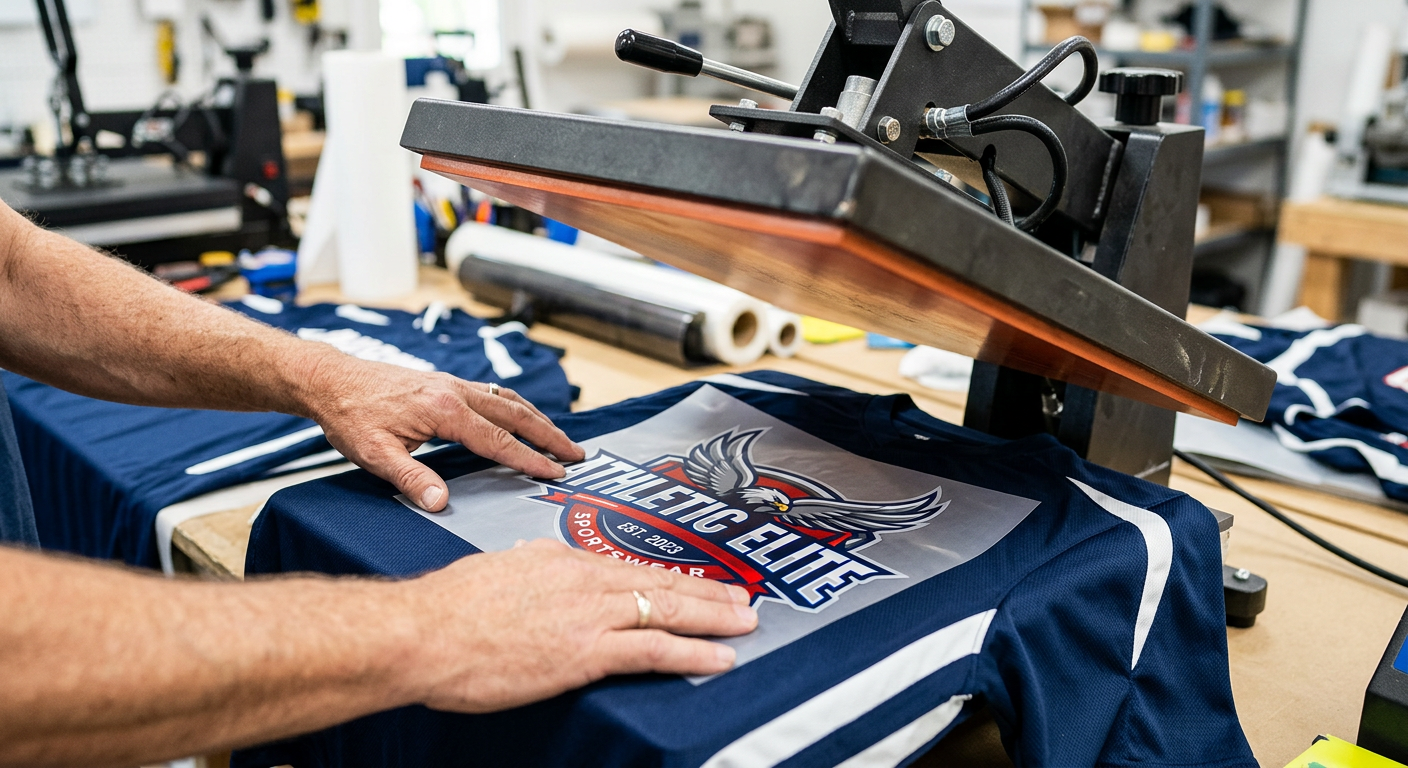
How to Press DTF Transfers on Polyester: Step-by-Step
1. Check the Garment Label First
Before you press, confirm whether the shirt is 100% polyester, a cotton-poly blend, spandex blend, or sublimated performance fabric. Sublimated jerseys and bright red or neon polyester garments are more likely to show dye migration, where garment dye bleeds into the print.
Roland DGA notes that colored polyester can create dye migration issues after heat application, especially with transfer printing on polyester garments. Their polyester DTF guidance suggests a lower press temperature around 275°F for certain workflows, which reinforces the main rule: start lower when the garment looks heat-sensitive.
2. Pre-Press Lightly, Not Aggressively
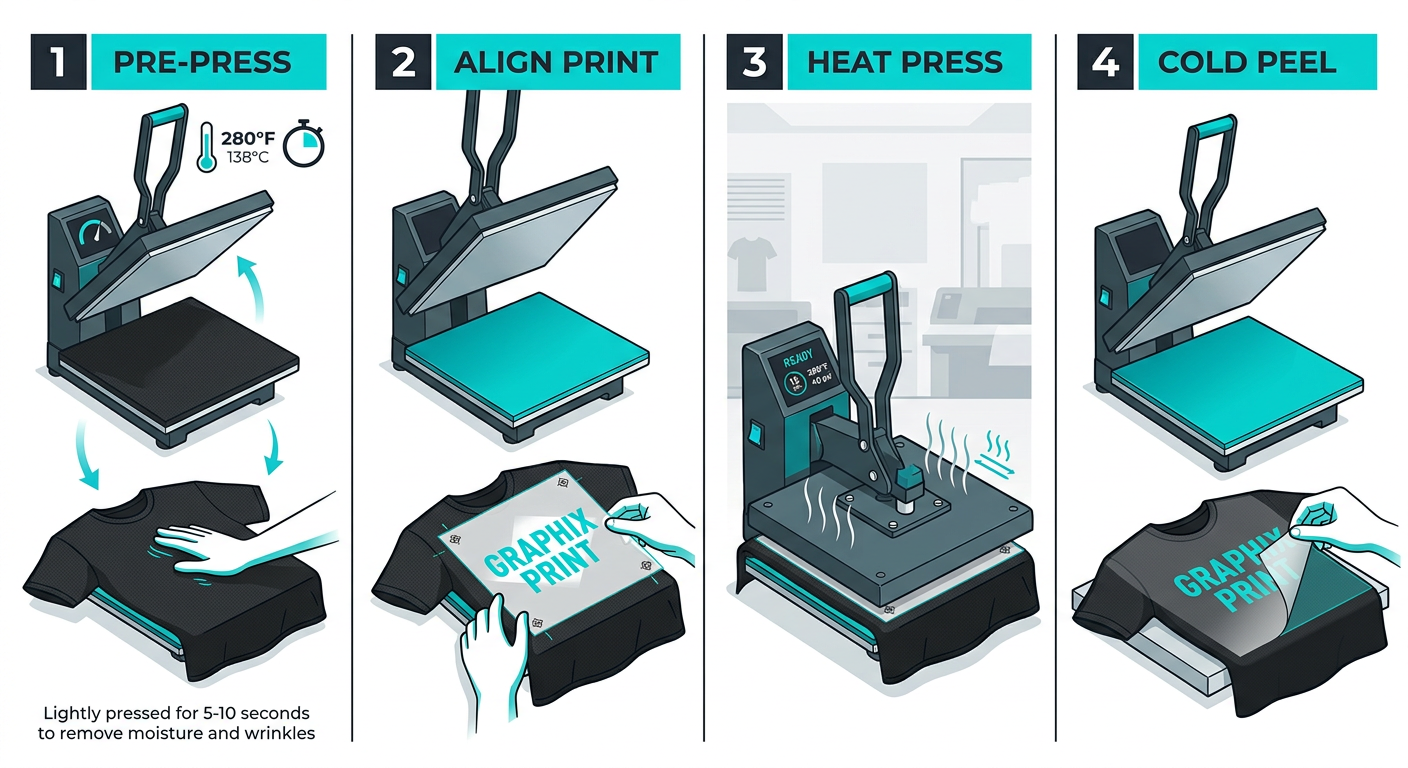
A quick pre-press removes moisture and wrinkles, but don’t smash polyester for 10 seconds before you even apply the transfer. Use 2-5 seconds with light to medium pressure.
If the fabric leaves a shiny square after the pre-press, lower the temperature, reduce pressure slightly, or use a pressing pillow. That test tells you the garment needs a softer touch.
3. Position the Transfer Smoothly
Lay the garment flat and make sure seams, zippers, collars, and plackets sit off the pressing area. Any raised seam can steal pressure from the design, which causes edge lifting or incomplete adhesion.
For repeat jobs, use a T-square, collar guide, or laser alignment tool. Small apparel brands and Etsy sellers save serious time by setting a placement standard before pressing a batch.
4. Press at the Right Temperature
For most polyester DTF jobs, start at 300°F for 10-12 seconds with firm, even pressure. For thin performance shirts, sublimated jerseys, or heat-sensitive activewear, test closer to 285-295°F.
If the transfer doesn’t release cleanly after cooling, don’t rip it. Cover it again, press for a few more seconds, let it cool fully, then peel slowly from one corner.
5. Let It Cool Completely Before Peeling
Cold peel means cold. Not warm. Not almost cool. Fully cool.
Peeling too early is one of the most common reasons DTF lifts, looks cloudy, or loses fine detail. Give the film time to release cleanly, especially on polyester where the adhesive bond benefits from a stable cool-down.
6. Finish Press for Durability
After peeling, cover the print with parchment paper or a finishing sheet and press again for 3-5 seconds. This helps set the adhesive, smooth the finish, and improve wash durability.
Don’t overdo this step on polyester. A short finish press is enough. Longer isn’t always better when the fabric is heat-sensitive.
Common Polyester DTF Problems and Fixes
Shiny Press Marks
Shiny squares usually come from too much heat, too much pressure, or direct platen contact on delicate polyester. Lower the temperature, shorten the time, and use a protective sheet.
A pressing pillow can also help because it raises the print area while letting seams fall away. That gives you better contact without crushing the entire garment.
Dye Migration
Dye migration happens when polyester dye moves into the transfer and changes the print color. You’ll see this most often on red, maroon, navy, black, and sublimated jerseys.
Use lower heat, shorter press time, and transfers with strong opacity. If you’re decorating high-risk uniforms, test one sample and let it sit before approving the full job.
Edges Lifting After Peel
Lifting usually means one of three things: not enough pressure, peeling too soon, or uneven contact. Re-press with parchment for 5 seconds, cool completely, and peel again.
If the same edge fails across multiple shirts, check your heat press platen for cold spots or pressure gaps. A quality heat press matters more on polyester than most beginners expect.
Print Feels Too Thick
DTF naturally has more body than sublimation, but it should still feel flexible. If the print feels stiff, you may be over-pressing or using artwork with a large solid coverage area.
For fashion tees and activewear, consider breaking up oversized solid graphics with negative space. The shirt will move better, and your customers will notice the difference.
Best Tools for Pressing Polyester DTF
A clamshell or swing-away heat press is the most reliable choice for DTF transfers on polyester. Hobby presses can work for small designs, but they’re harder to control across full-front prints.
You’ll also want:
- Parchment paper or a finishing sheet
- Pressing pillow for seams and collars
- Lint roller for dust and fibers
- Temperature test strips or heat gun
- T-square or placement ruler
- Sample garment for testing
National suppliers like Ninja Transfers, Transfer Express, and DTF Sheet can be useful for mail-order workflows, especially if you’re comparing film types, peel styles, and production speed. For Arizona creators who need local pickup, live support, and quick production from Tempe, a local print partner can be the difference between shipping orders today and missing a launch date.
When to Use Standard, Glitter, or UV DTF
Standard DTF transfers are the best fit for polyester shirts, hoodies, team gear, uniforms, and merch. They’re full color, press-ready, and work across cotton, polyester, blends, nylon, and spandex.
For boutique drops, spirit wear, dance teams, or holiday apparel, glitter DTF transfers add sparkle while still using a heat press workflow. For hard goods like tumblers, packaging, helmets, laptops, and retail displays, UV DTF stickers apply without a heat press.
That gives small shops a simple product ladder: apparel transfers for garments, glitter for premium apparel, and UV stickers for hard-surface branding.
Care Tips After Pressing
Let the garment rest before washing. A 24-hour wait is a smart habit for customer orders, school uniforms, and resale apparel.
Wash inside out with cold water and mild detergent. Tumble dry low or hang dry when possible. Avoid bleach, fabric softener, and direct ironing over the print.
These care steps are simple, but they protect your margin. Fewer reprints means more profit per shirt.
Get Press-Ready Transfers Printed in Tempe
Need polyester-friendly transfers without minimums or setup fees? Order online from Five Star DTF for same-day printing, fast nationwide shipping, free shipping over $100, and local pickup in Tempe, Arizona.
Order online: https://fivestardtf.com/product/dtf-transfers/
Local pickup: 305 S Rockford Dr Ste B, Tempe, AZ 85281
If you have questions about artwork, placement, or garment compatibility, reach out through the Five Star DTF contact page before pressing a full batch.
FAQ
Can you press DTF transfers on 100% polyester?
Yes. DTF transfers work well on 100% polyester when you use lower heat, firm even pressure, and a full cold peel. Start around 285-300°F and test before production.
What temperature should I use for polyester DTF?
A strong starting point is 300°F for 10-12 seconds. For thin activewear or sublimated polyester, test closer to 275-295°F to reduce press marks and dye migration.
Do I need a Teflon sheet for polyester?
You don’t always need one for the first press, but a finishing sheet or parchment paper is helpful for the final press. It protects the garment and creates a smoother finish.
Why did my polyester shirt get shiny after pressing?
Shiny marks usually mean the fabric got too much heat, pressure, or direct platen contact. Lower the temperature, shorten the press, and use a pressing pillow or protective sheet.
Should DTF transfers be hot peel or cold peel on polyester?
Most polyester DTF applications perform best with a cold peel. Let the film cool completely, then peel slowly from one corner.
Can I use a Cricut EasyPress for polyester DTF?
You can use it for small designs, but a commercial heat press gives better pressure and consistency. For resale apparel, a clamshell or swing-away press is the smarter choice.
Quick Summary
Pressing DTF on polyester is all about control. Use lower heat than cotton, keep pressure firm but even, cool the film fully, and finish press briefly for durability.
For most polyester garments, 300°F for 10-12 seconds is a reliable starting point. When the fabric is thin, sublimated, or heat-sensitive, test lower before you commit to a full run.
Final Takeaway
Polyester isn’t difficult, it’s just less forgiving than cotton. Once you dial in your press, DTF gives you vivid color, strong stretch, and a professional finish on activewear, uniforms, hoodies, and merch.
Test first, peel cold, and don’t overcook the garment. That’s the difference between a shirt that looks homemade and one that’s ready to sell.
About Five Star DTF
Five Star DTF is Arizona’s leading provider of
DTF transfers, Glitter DTF prints, UV DTF stickers,
and Sublimation transfers, offering same-day printing, fast nationwide shipping,
and convenient local pickup in Tempe, Arizona.
We proudly serve Tempe, Scottsdale, Phoenix, Mesa, Gilbert, Chandler, and all of Arizona,
helping creators, apparel brands, small businesses, and print shops produce premium, press-ready transfers with
vivid color, soft stretch, and long-lasting durability.
There are no setup fees, no minimum orders, and production is always fast.
Our Top Products
- DTF Transfers
- Glitter DTF Transfers
- UV DTF Stickers
- Sublimation Transfers
- Press Instructions & Tips
- Contact & Local Pickup
Artwork Help
Need your artwork cleaned, fixed, resized, or made print-ready? We offer background removal, vectorizing, color correction, and gang sheet layout.
Ready to Print?
Order DTF Transfers or
Upload Your Artwork to get started today.
All orders over $100 ship free, printed in Tempe, AZ and shipped statewide and nationwide.