

DTF Heat Press Settings Guide For Better Results Fast
Getting great press results is usually not about luck. It’s about control, consistency, and using the right settings for the garment, transfer, and machine you actually have in front of you.
If you’ve ever pressed a design that looked perfect on screen but came out dull, cracked, or lifted at the edges, you already know why a solid dtf heat press settings guide matters. The good news is that once you lock in the basics, you can get repeatable, press-ready results without guessing.
What DTF Heat Press Settings Really Control
The right settings affect three things: how well the adhesive activates, how deeply the transfer bonds to the fabric, and how soft the finished print feels. Too much heat can scorch garments or flatten the print. Too little can leave edges lifting after the first wash.
That’s why the best approach is to think in ranges, not one magic number. Different presses, platen surfaces, and fabrics all behave a little differently.
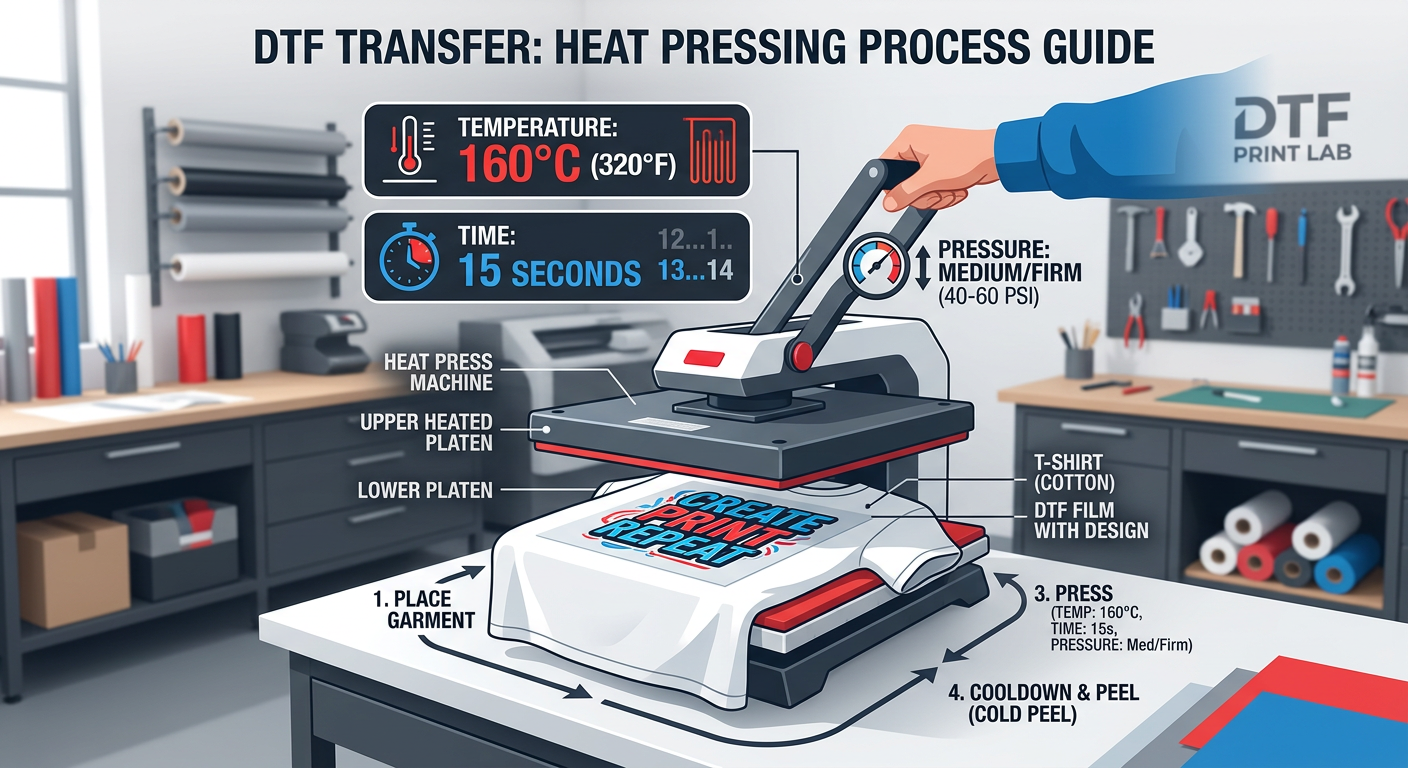
Recommended Starting Settings For Most DTF Transfers
Standard press baseline
A reliable starting point for many DTF transfers is:
- Temperature: 300 to 325°F
- Time: 10 to 15 seconds
- Pressure: medium to firm
This range works well for many cotton and cotton-blend shirts. If your press runs hot, start on the lower end. If your transfers are not bonding fully, slightly increase time or pressure before you jump straight to more heat.
Hot peel or cold peel
Always follow the film or transfer instructions from your supplier. Some transfers are hot peel, while others need a full cool-down. If you peel too soon on a cold-peel product, you can pull up edges or distort the print.
For press-specific guidance, Five Star DTF keeps helpful setup details on its instructions page.
Best Settings By Fabric Type
Cotton shirts
Cotton is the easiest place to start. It holds heat well and usually gives strong adhesion. A medium-firm press at about 300 to 325°F is a practical starting point.
Polyester and performance wear
Polyester needs a little more care because it can scorch or warp under high heat. Use the lowest effective temperature, and test on a sample garment first. Shorter press times often work better here.
Hoodies and thicker garments
For thick items like fleece or hoodies, pre-pressing helps remove moisture and flatten seams. That makes the final press more even, especially around zippers, pockets, and seams.
If you sell sweatshirts or outerwear, you may also want to look at DTF transfers made for strong, durable retail-style applications.
How Pressure Changes The Final Result
Pressure matters more than a lot of people think. If pressure is too light, the adhesive may not fully contact the fibers. If it’s too heavy, the print can look overly compressed or the garment can show press marks.
A good rule is firm enough to create even contact, but not so hard that the platen leaves an obvious outline. If your press has an adjustable gauge, use it consistently and write down what works best for each fabric type.
Common Mistakes To Avoid
Skipping the pre-press
Moisture is one of the biggest enemies of adhesion. A quick pre-press of 3 to 5 seconds removes moisture and smooths the fabric surface.
Pressing on an uneven surface
Hood seams, pocket edges, and thick collars can create weak spots. Use a pressing pillow or reposition the garment when needed.
Peeling too fast
Even if a transfer looks ready, don’t rush the peel unless the product is designed for it. Rushed peeling is one of the fastest ways to ruin an otherwise perfect print.
Not testing your press
Every machine is different. Two heat presses set to the same temperature may still run differently, so always test before a production run.
Choosing The Right Transfer Product Matters Too
Not every transfer is built for the same result. For shirts, direct-to-film transfers are a strong choice when you want sharp detail and vibrant color. For retail-style branding and product labels, UV DTF stickers are great for hard surfaces. If you want a more eye-catching finish, glitter DTF transfers can add premium texture and shine.
That’s the thing about heat press success, the settings matter, but the product choice matters just as much.
Quick Troubleshooting Checklist
If the transfer is lifting
Increase pressure first, then test a few extra seconds of press time.
If colors look faded
Check whether your press temperature is too low, or whether you’re under-pressing the design.
If the shirt shows scorch marks
Lower the temperature and shorten the press time, especially on poly blends.
If the print feels too stiff
You may be over-pressing. Reduce pressure or time slightly on the next test.
FAQ About DTF Heat Press Settings
What is the best temperature for DTF transfers?
A common starting point is 300 to 325°F, but the best setting depends on the transfer film, fabric, and your press.
How long should I press DTF transfers?
Most transfers press well in 10 to 15 seconds, with pre-pressing and a second press if needed for a smoother finish.
Do DTF transfers work on cotton and polyester?
Yes. DTF works on both, but polyester usually needs a gentler approach to avoid heat damage.
Should I use high pressure or medium pressure?
Medium to firm pressure is usually the sweet spot. You want strong contact without crushing the garment.
Why is my DTF transfer not sticking?
The issue is often low pressure, uneven platen contact, or peeling too early. Check those before changing everything else.
Do I need a finish press after peeling?
A quick post-press with parchment or a protective sheet can improve feel and durability.
Where can I order press-ready DTF transfers quickly?
You can order online from Five Star DTF for fast turnaround, no minimums, and local pickup in Tempe, AZ.
Ready To Press Better Results?
If you want press-ready transfers with fast turnaround, strong color, and reliable adhesion, Five Star DTF is built for your workflow. Whether you need DTF transfers, UV DTF stickers, glitter DTF transfers, or same-day local pickup in Tempe, Arizona, you can get moving fast.
Order online: https://fivestardtf.com/product/dtf-transfers/
📍 Local pickup: 305 S Rockford Dr Ste B, Tempe, AZ 85281
Conclusion
A dependable dtf heat press settings guide does more than help you avoid mistakes. It saves time, improves consistency, and helps every press look more professional.
Start with the right temperature, time, and pressure. Test by fabric type. Keep notes. And when you need high-quality transfers that are ready to press, Five Star DTF gives you a fast, Arizona-based source you can count on.
About Five Star DTF
Five Star DTF is Arizona’s leading provider of
DTF transfers, Glitter DTF prints, UV DTF stickers,
and Sublimation transfers — offering same-day printing, fast nationwide shipping,
and convenient local pickup in Tempe, Arizona.
We proudly serve Tempe, Scottsdale, Phoenix, Mesa, Gilbert, Chandler, and all of Arizona,
helping creators, apparel brands, small businesses, and print shops produce premium, press-ready transfers with
vivid color, soft stretch, and long-lasting durability.
There are no setup fees, no minimum orders, and turnarounds are always fast.
Our Top Products
- DTF Transfers
- Glitter DTF Transfers
- UV DTF Stickers
- Sublimation Transfers
- Press Instructions & Tips
- Contact & Local Pickup
Artwork Help
Need your artwork cleaned, fixed, resized, or made print-ready? We offer background removal, vectorizing, color correction, and gang sheet layout.
Ready to Print?
Order DTF Transfers or
Upload Your Artwork to get started today.
All orders over $100 ship free — printed in Tempe, AZ and shipped statewide and nationwide.