

DTF transfers are popular for a reason, they’re fast, vibrant, and beginner-friendly once you know the right process. If you’ve ever pressed a design and wondered why it lifted, looked dull, or cracked after washing, the issue is usually not the transfer itself, it’s the application.
This guide gives you clear DTF Transfer Instructions you can use for consistent results on cotton, polyester, and blends. You’ll also get recommended settings, troubleshooting help, and a simple way to keep your workflow repeatable whether you’re printing for your brand, your shop, or local customers in Arizona.
What You Need Before Pressing
Before you start, gather everything so you’re not rushing mid-press. A clean setup makes a big difference in final quality.
- DTF transfer
- Heat press
- Garment or fabric item
- Parchment or finishing sheet if desired
- Lint roller
- Firm, flat pressing surface
If you’re ordering ready-to-press film from a trusted supplier, you can shop DTF Transfers from Five Star DTF for fast turnaround and Arizona pickup.
Recommended DTF Heat Press Settings
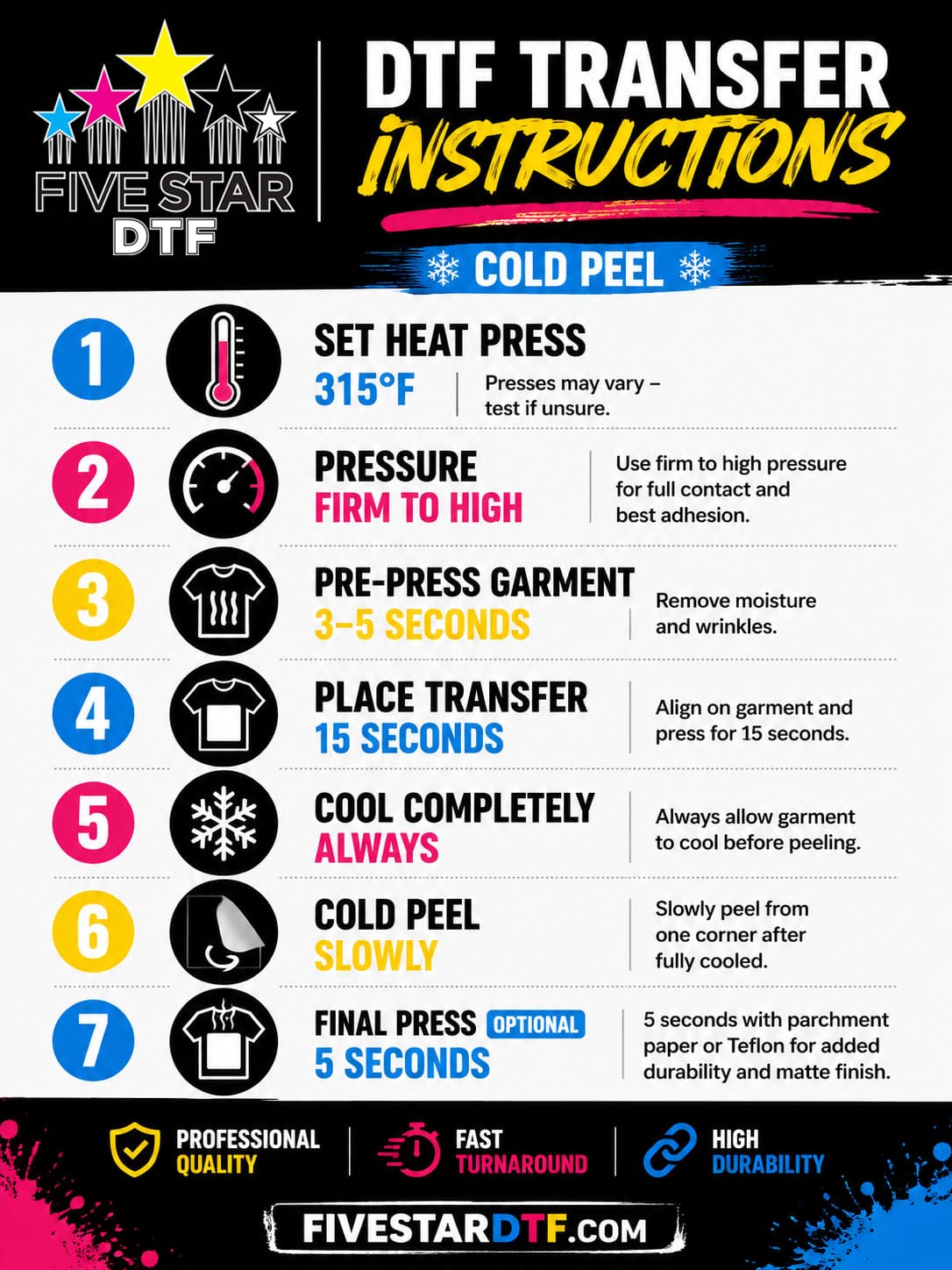
Use these settings as a strong starting point, then test based on your fabric and press.
| Setting | Recommended Range |
|---|---|
| Temperature | 300°F to 320°F |
| Pressure | Medium to firm |
| Press Time | 10 to 15 seconds |
| Peel Type | Cold peel |
| Final Press | 5 to 10 seconds |
Why pressure matters
Too little pressure can cause weak adhesion and lifting at the edges. Too much pressure can flatten the print or create a harsh hand feel. You want firm, even contact across the full design area.
Step-by-Step DTF Transfer Instructions
1. Pre-press the garment
Press the garment for 5 to 10 seconds first. This removes moisture and wrinkles, which helps the transfer bond more evenly.
2. Position the transfer
Place the design exactly where you want it. Double-check alignment before pressing because once the adhesive activates, repositioning becomes much harder.
3. Press with the correct settings
Close the press at the recommended temperature, time, and pressure. Stay consistent. DTF works best when your process is repeatable.
4. Let it cool completely
DTF is usually a cold peel process. Wait until the transfer is fully cool before removing the film. Rushing this step can cause lifting, missing details, or partial release.
5. Peel slowly and evenly
Start at one corner and peel in a smooth motion. If any part resists, stop and let it cool a little longer.
6. Apply a final press
Cover the design with parchment or a protective sheet and press again for 5 to 10 seconds. This final press improves durability, reduces shine, and helps the print feel more finished.
Common DTF Troubleshooting Problems
Transfers are not sticking
This usually means the press was too cool, the pressure was too light, or the garment wasn’t pre-pressed. It can also happen if you peeled too early.
Edges are lifting
Lifted edges often point to uneven pressure or insufficient final pressing. Check that the entire platen is making solid contact with the garment.
Prints look dull
A dull finish can come from underheating, overpressing, or poor film handling. Make sure your heat press is calibrated and your settings are consistent.
Cloudy appearance
Cloudiness can appear when the adhesive or film is not fully cooled before peeling, or when a final press is done without a protective sheet.
Cracking after washing
Cracking is usually tied to improper curing, too much heat, or poor wash care. Wash inside out in cold water and avoid harsh drying cycles when possible.
Best Practices for Better Results
A few habits make a huge difference over time.
- Test each new fabric type before full production
- Keep your heat press calibrated
- Use even, firm pressure every time
- Don’t rush cold peel
- Store transfers flat in a dry space
- Follow proper wash instructions for customers
If you also sell add-ons, check out UV DTF Stickers and Glitter DTF Transfers for more product variety.
Printable DTF Transfer Instruction Card Use
A printable instruction card is a smart way to reduce mistakes and improve consistency. Include your temperature, time, pressure, peel method, and final press steps right on the card so customers or team members can press confidently.
That is especially helpful for print shops, Etsy sellers, and small brands that want fewer support questions and fewer failed presses.
FAQs
What is the best temperature for DTF transfers?
A good starting range is 300°F to 320°F. The exact setting depends on your press, fabric, and transfer material.
Do I need to cold peel DTF transfers?
Yes, most DTF transfers are best peeled cold. Let the design cool completely before removing the film.
Can I press DTF on cotton and polyester?
Yes. DTF works well on cotton, polyester, and many blends, which is one reason it’s so popular for custom apparel.
Why did my DTF transfer crack?
Cracking usually comes from improper pressing, too much heat, or rough wash and dry care. Use the correct settings and avoid overpressing.
Should I do a final press?
Yes. A short final press with parchment or a protective sheet can improve finish and durability.
What pressure should I use?
Use medium to firm pressure, evenly distributed. Weak pressure often causes lifting, while excessive pressure can affect appearance.
Order Press-Ready Transfers from Five Star DTF
If you want reliable prints without guessing on quality, order from Five Star DTF. We’re a trusted Arizona source for premium DTF transfers, gang sheets, UV DTF stickers, glitter transfers, and same-day pickup in Tempe.
Order online: https://fivestardtf.com/product/dtf-transfers/
📍 Local pickup: 305 S Rockford Dr Ste B, Tempe, AZ 85281
Whether you need DTF transfers same-day, DTF supplies, or fast nationwide shipping, Five Star DTF is built for small businesses that need press-ready results without the wait.
Summary
DTF success comes down to a few simple things, the right heat, firm pressure, proper cold peel timing, and a solid final press. Once you dial in those steps, you’ll get cleaner adhesion, brighter color, and more durable results.
Use this guide as your repeatable workflow, and pair it with a printable instruction card for easier production. If you need dependable transfers in Arizona or across the U.S., Five Star DTF is ready to help.
About Five Star DTF
Five Star DTF is Arizona’s leading provider of
DTF transfers, Glitter DTF prints, UV DTF stickers,
and Sublimation transfers — offering same-day printing, fast nationwide shipping,
and convenient local pickup in Tempe, Arizona.
We proudly serve Tempe, Scottsdale, Phoenix, Mesa, Gilbert, Chandler, and all of Arizona,
helping creators, apparel brands, small businesses, and print shops produce premium, press-ready transfers with
vivid color, soft stretch, and long-lasting durability.
There are no setup fees, no minimum orders, and turnarounds are always fast.
Our Top Products
- DTF Transfers
- Glitter DTF Transfers
- UV DTF Stickers
- Sublimation Transfers
- Press Instructions & Tips
- Contact & Local Pickup
Artwork Help
Need your artwork cleaned, fixed, resized, or made print-ready? We offer background removal, vectorizing, color correction, and gang sheet layout.
Ready to Print?
Order DTF Transfers or
Upload Your Artwork to get started today.
All orders over $100 ship free — printed in Tempe, AZ and shipped statewide and nationwide.